General Requirements
The General Requirements tab contains fundamental wind parameters that apply to all wind load calculations in the module. These parameters establish the baseline conditions for MWFRS and C&C analyses.
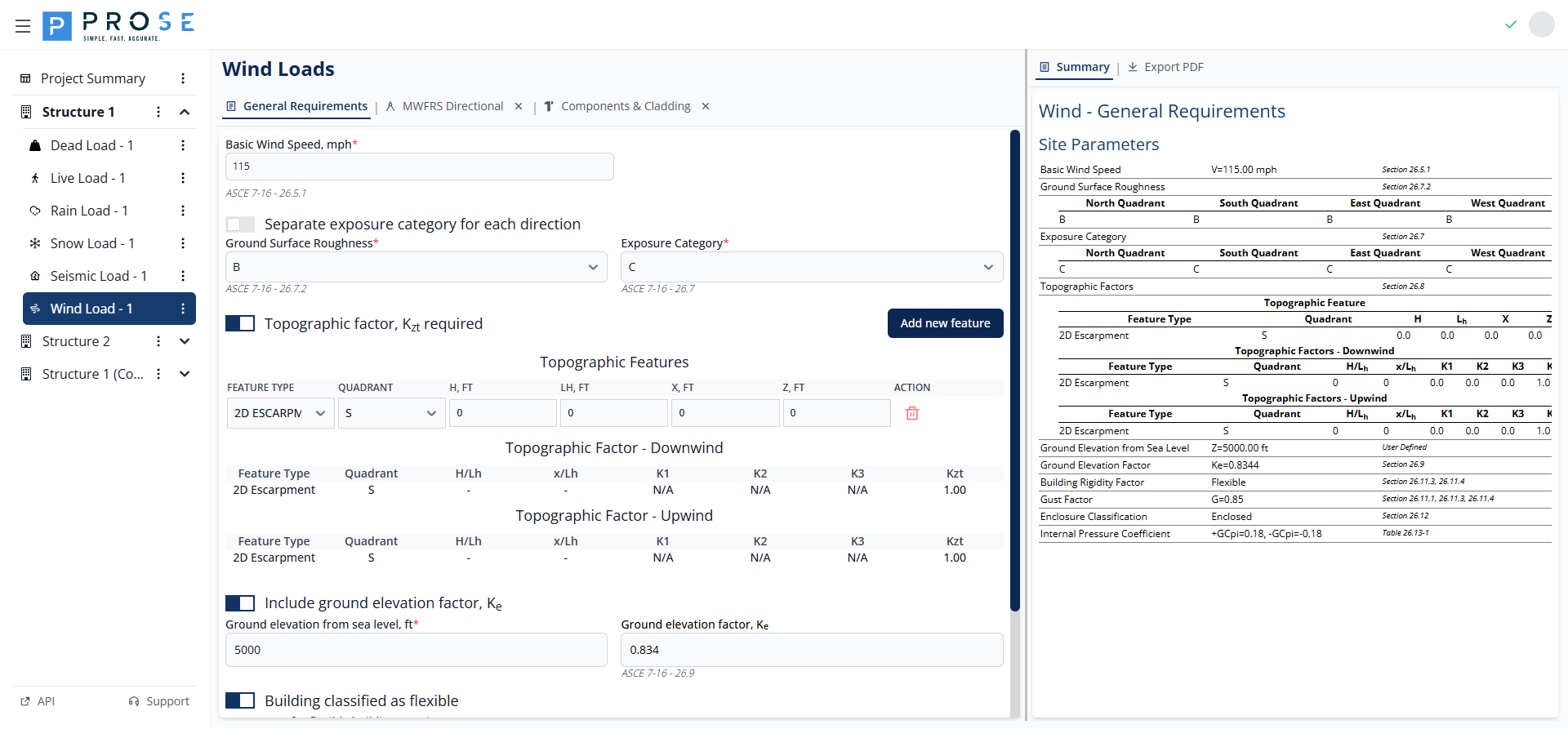
Key Features
- Support for ASCE 7-10 and ASCE 7-16 code years
- Basic wind speed input with risk category consideration
- Consolidated or direction-specific exposure categories
- Topographic factor calculation for hills, ridges, and escarpments
- Ground elevation factor for high-altitude sites (ASCE 7-16)
- Rigid and flexible building classification
- Enclosure classification with automatic GCpi calculation
Getting Started
- Navigate to the Wind Load module in your structure
- The General Requirements tab opens by default
- Enter the basic wind speed for your project location
- Select the exposure category (or configure by direction)
- Enable topographic factor if site is on a hill, ridge, or escarpment
- Configure building flexibility and enclosure classification
- Proceed to MWFRS or C&C tabs for pressure calculations
Basic Wind Speed
The basic wind speed is the fundamental input for all wind load calculations per ASCE 7-16 Section 26.5.1.
- Enter the basic wind speed value in mph
- The value represents the 3-second gust wind speed at 33 ft above ground
- Obtain values from ASCE 7 wind speed maps or local building codes
- Risk Category determines which wind speed map to use
Exposure Category
Exposure category accounts for the ground surface roughness affecting wind flow. The module supports consolidated or separate exposure categories per direction.
Consolidated Exposure
By default, a single exposure category applies to all wind directions:
- Exposure B: Urban and suburban areas with numerous closely spaced obstructions
- Exposure C: Open terrain with scattered obstructions, flat open country
- Exposure D: Flat, unobstructed areas exposed to wind flowing over open water
Separate Exposure by Direction
Enable direction-specific exposure categories when site conditions vary by cardinal direction.
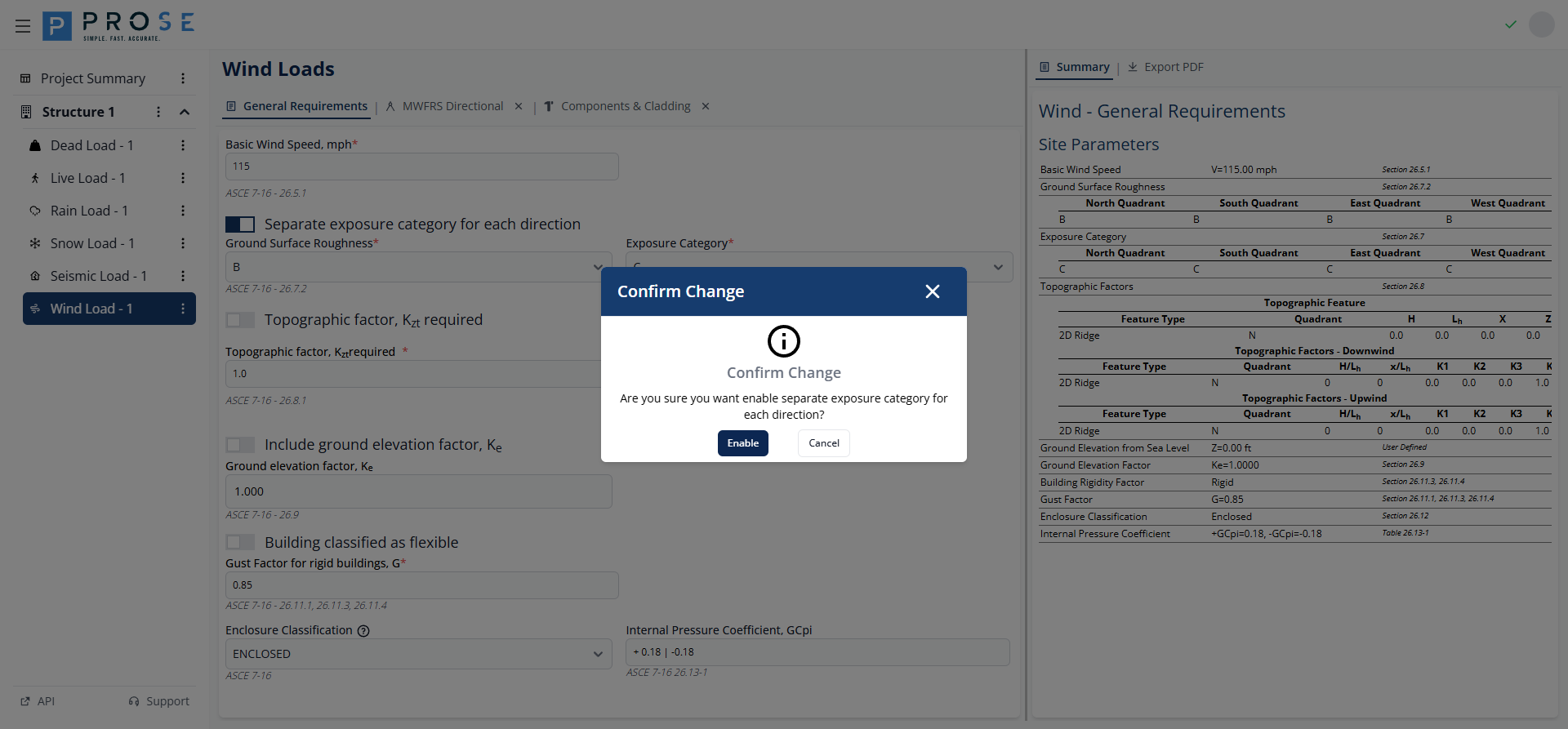
- Check Separate exposure category for each direction
- A confirmation dialog appears explaining the implications
- Click Confirm to enable separate exposure
- Configure Ground Surface Roughness and Exposure Category for each direction (N, S, E, W)
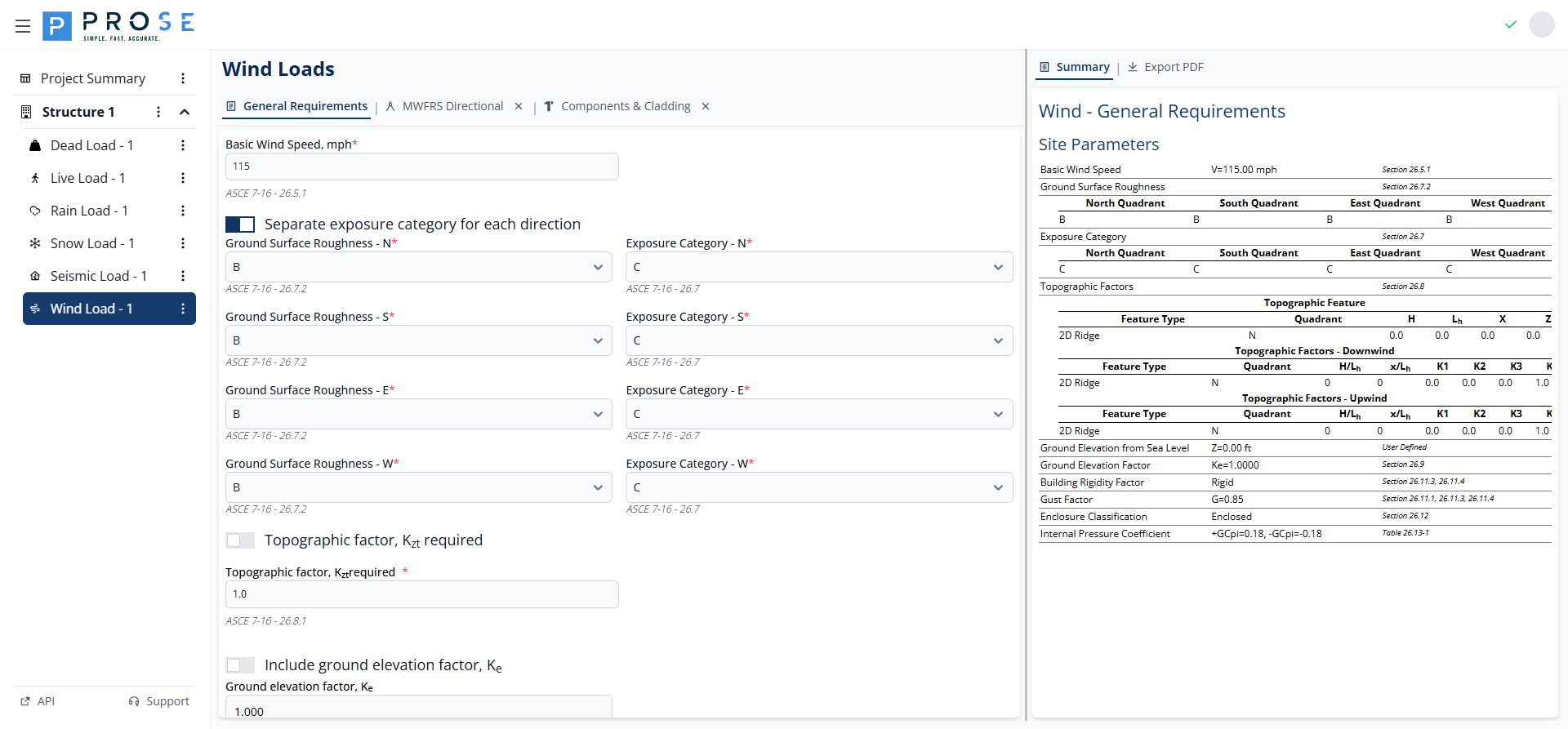
Ground Surface Roughness
Ground Surface Roughness (B, C, or D) per ASCE 7-16 Section 26.7.2 determines the Exposure Category. The roughness category is based on surface conditions upwind of the site.
Topographic Factor
The topographic factor Kzt accounts for wind speed-up effects over hills, ridges, and escarpments per ASCE 7-16 Section 26.8.2.
- Check Topographic factor, Kzt required to enable topographic calculations
- Click Add new feature to add topographic features
- Configure each feature with the parameters below
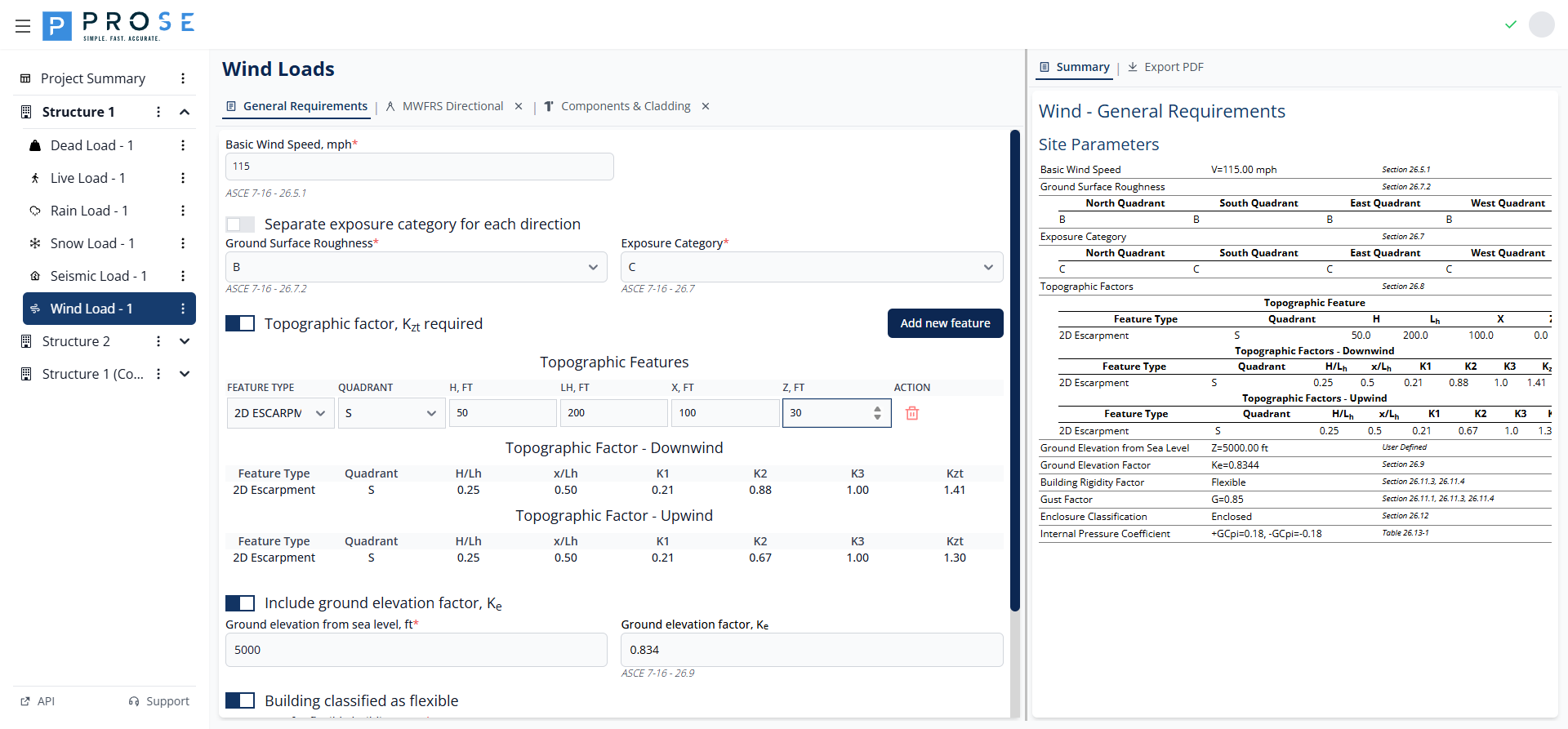
Topographic Feature Parameters
| Parameter | Description |
|---|---|
| Feature Type | 2D RIDGE, 2D ESCARPMENT, or 3D AXISYMMETRICAL HILL |
| Quadrant | Cardinal direction (N, E, S, W) where feature is located |
| H, ft | Height of the hill or escarpment relative to upwind terrain |
| Lh, ft | Distance upwind of crest to where the ground elevation is half H |
| x, ft | Distance from crest to building site (upwind is negative) |
| z, ft | Height above local ground level |
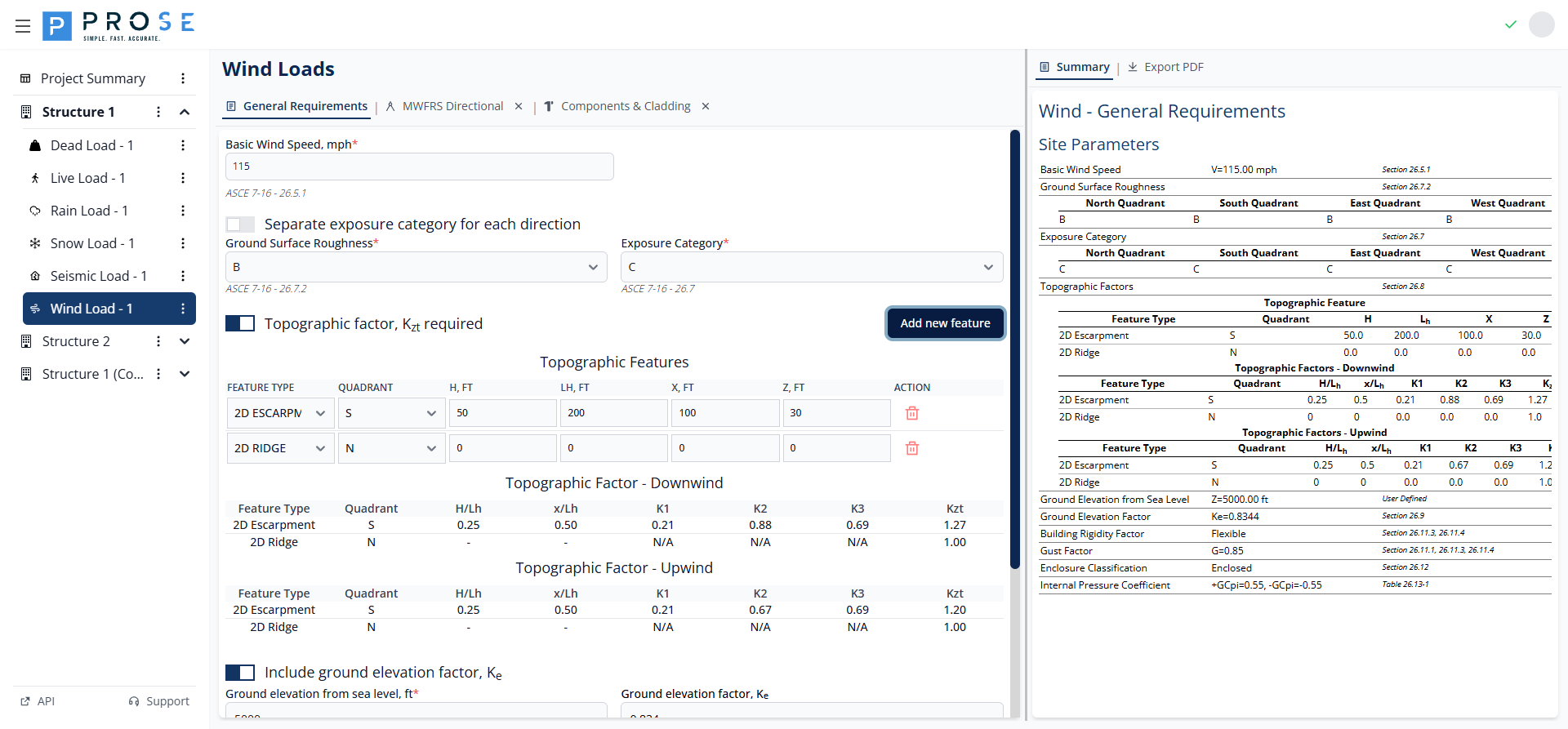
The module calculates K1, K2, K3 multipliers and the resulting Kzt factor for both upwind and downwind conditions. When H/Lh exceeds allowable limits or conditions don't warrant speed-up, Kzt defaults to 1.00.
Ground Elevation Factor
The ground elevation factor Ke accounts for reduced air density at high elevations per ASCE 7-16 Section 26.9.
- Check Include ground elevation factor, Ke to enable the calculation
- Enter the ground elevation from sea level in feet
- The Ke factor is calculated automatically
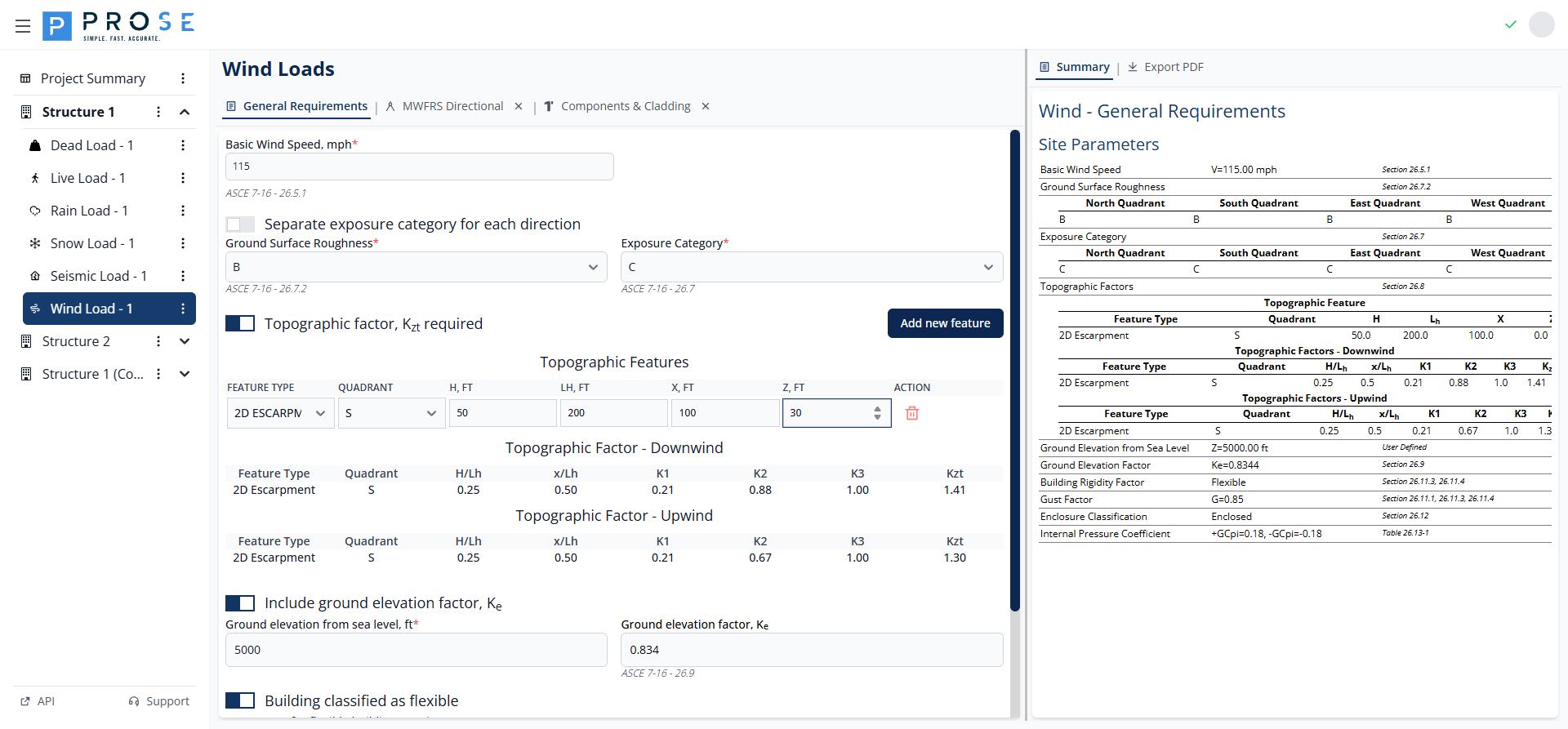
For sites at sea level, Ke = 1.000. Higher elevations result in lower Ke values, reducing wind pressures.
ASCE 7-10 vs ASCE 7-16
The ground elevation factor Ke was introduced in ASCE 7-16. When using ASCE 7-10, this option is not available as the standard assumes sea level air density.
Building Flexibility
Building flexibility affects the gust effect factor used in wind pressure calculations.
- Rigid Buildings: Use gust effect factor G = 0.85 (default)
- Flexible Buildings: Require calculation of gust effect factor Gf based on building dynamic properties
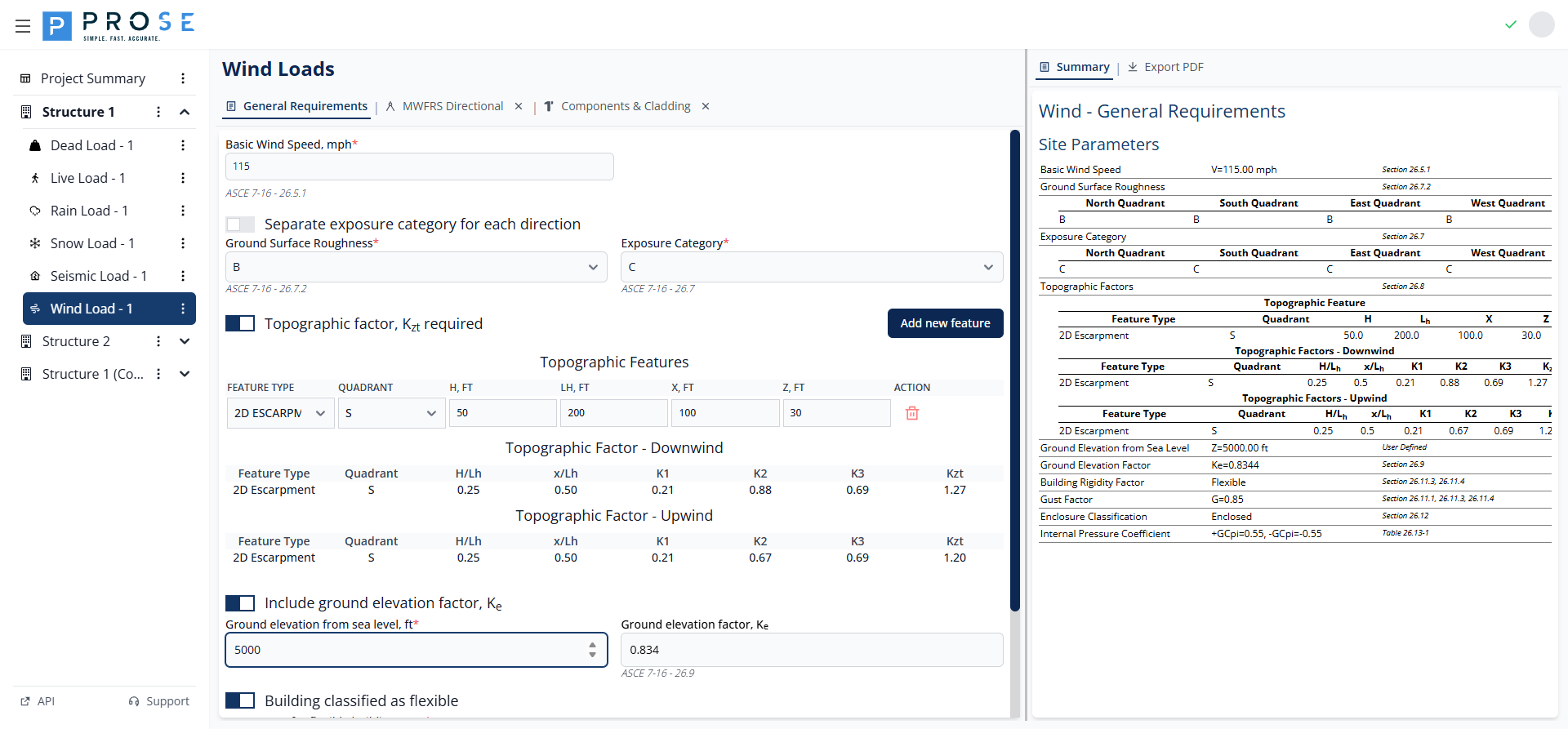
- Check Building classified as flexible if the building's fundamental natural frequency is less than 1 Hz
- Enter the calculated Gf value per ASCE 7-16 Sections 26.11.3 and 26.11.4
- Gf accounts for dynamic amplification from wind gusts
Enclosure Classification
Enclosure classification determines the internal pressure coefficient (GCpi) per ASCE 7-16 Section 26.13.
| Classification | GCpi | Application |
|---|---|---|
| ENCLOSED | ±0.18 | Buildings with no dominant openings |
| PARTIALLY ENCLOSED | ±0.55 | Buildings with dominant openings |
| OPEN | 0.00 | Buildings with 80%+ wall openings |
| PARTIALLY OPEN | Varies | Buildings between open and enclosed |
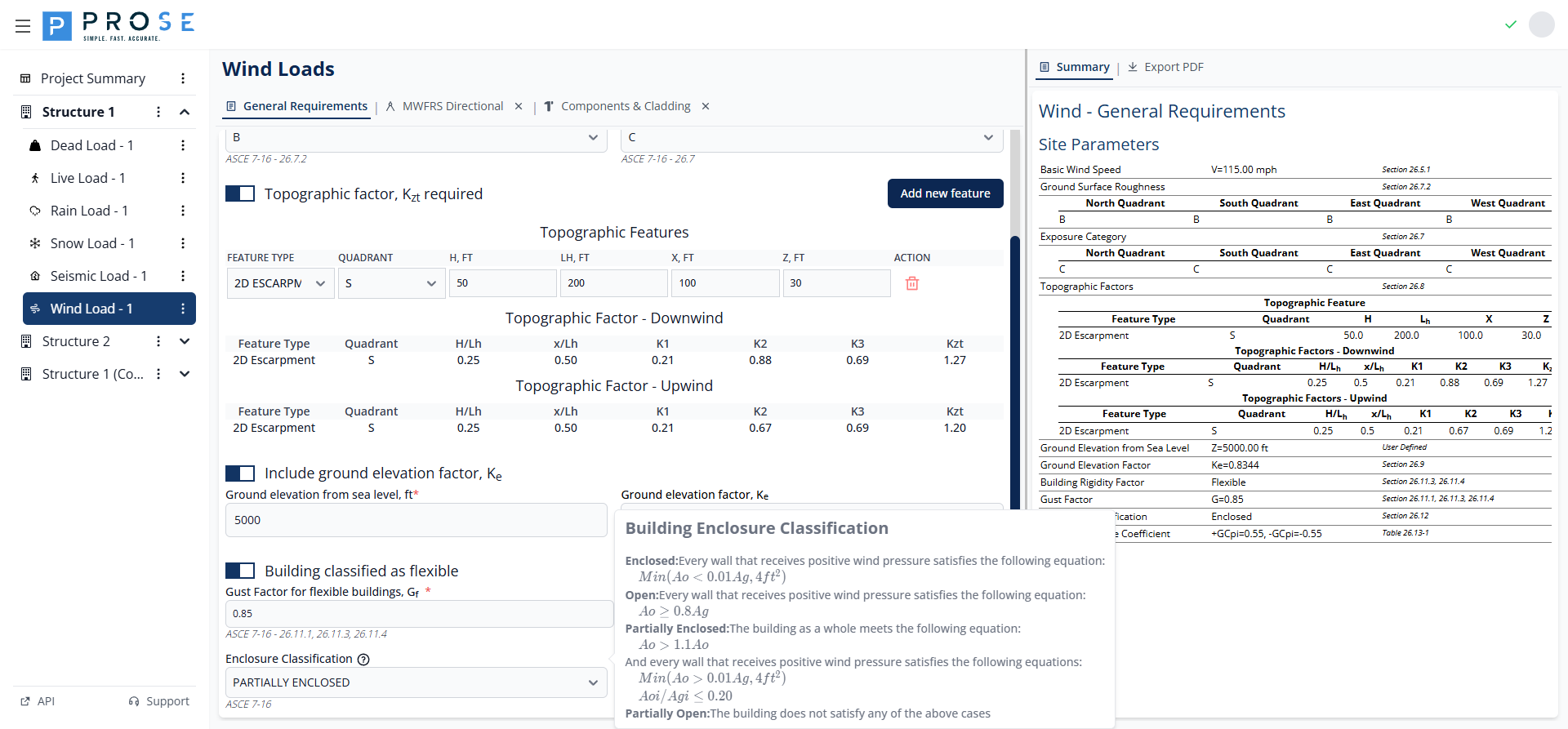
- Select the enclosure classification from the dropdown
- The Internal Pressure Coefficient (GCpi) updates automatically
- This value applies to all MWFRS and C&C calculations
Partially Enclosed Buildings
Partially enclosed buildings have significantly higher internal pressures (GCpi = ±0.55 vs ±0.18). Ensure accurate classification to avoid underestimating wind loads on building components.
Best Practices
See Also
- After configuring general requirements, proceed to MWFRS Directional for main frame pressures
- For component and cladding design, see Components & Cladding
- For troubleshooting wind issues, see Wind Load Issues
Wind Speed Selection
- Verify basic wind speed from ASCE 7 maps for your Risk Category
- Check with local building officials for higher requirements
- Use the more stringent value when local codes exceed ASCE 7
Exposure Category
- Use separate exposure categories when site conditions vary significantly by direction
- Document the basis for exposure category determination
- Consider future development that may change upwind conditions
Topographic Effects
- Include topographic factors for buildings on or near hills, ridges, or escarpments
- Verify H/Lh ratios meet requirements for speed-up effects
- Document site survey data supporting topographic inputs
Enclosure Classification
- Carefully evaluate glazing and opening sizes for enclosure determination
- Coordinate with architect on location and size of large openings
- Classify conservatively when opening status is uncertain during windstorm
Code Reference
General requirements per ASCE 7-16:
- Section 26.5.1: Basic Wind Speed
- Section 26.7: Exposure Categories
- Section 26.7.2: Ground Surface Roughness
- Section 26.8.2: Topographic Factor Kzt
- Section 26.9: Ground Elevation Factor Ke
- Section 26.10: Velocity Pressure
- Section 26.11: Gust Effect Factor
- Section 26.13: Internal Pressure Coefficient